
-
KanBo Installation
- KanBo Installation on Office 365 and Azure (Manual)
- KanBo Installation on Office 365 and Azure (KanBo Installer)
- KanBo On-Premises Installation Requirements and Prerequisites
- KanBo Installation On-Premise SharePoint 2013/2016/2019
- Creating and Updating the Elastic Cloud Deployment
- Creating a Linux Based Virtual Machine on Azure for Elastic Search
- Installing and Configuring Elastic Search on Debian
- Creating a Windows Virtual Machine on Azure for Elastic Search
- Installing and Configuring Elastic Search on Windows
- How to Create a X.509 High-Trust Certificate
- KanBo Setup
- KanBo Modern Webpart Installation
- Uninstall KanBo from Office 365
- Supported Browsers
-
KanBo Updates
-
Additional Components
- Setting Up KanBo Email Notifications on Azure
- Setting Up KanBo Email Notifications (On-Premise)
- KanBo Outlook Add-in Installation (O365 & On-Premise)
- Send Email to KanBo - Installation (Cloud)
- Send Email to KanBo - Installation (On-Premise)
- Enabling Email a Card Message
- KanBo and Microsoft Power Automate integration: Installation
- KanBo and Microsoft Power Automate Integration: Activation
- Installation of KanBo MyBoard Synchronization with Outlook Calendar and Outlook Tasks
- Installation of the Autodesk BIM Plugin for KanBo
- KanBo and UiPath Integration: Configuration
- Nintex Integration Installation
- KanBo API for Developers
- KanBo External User Groups (Active Directory Integration)
- KanBo Mini Application Installation
- Plugin for Adding Users to KanBo / Sharepoint When They First Enter it
- SharePoint Profiles Synchronization
- SharePoint Site Collection Balancing and Admin Warnings
- Sync Targets
- Installation of the KanBo Teams App
-
Tips & Tricks
- Configure How Documents Should Be Opened from KanBo
- Customize KanBo Background Images and KanBo Colors
- Define Board Features to Be Enabled or Disabled by Default
- Disable Sleeping Tabs in Browsers
- Disable/Enable Public Boards Creation
- Find Out the Certificate Expiration Dates On-Premise
- Get KanBo ID
- How to Change the Help URL in Your KanBo
- Import Users to KanBo
- Renew Certificate for KanBo Graph Installation
- Show KanBo Version
- Removing syncing of profile pictures in the Profile Sync job
-
Troubleshooting
KanBo Error: 401 (On-Premise Installation)
Table of Contents
KanBo Log File shows 401 Error (On-Premise Installation)
If you are getting an error message like this in KanBo, please check the KanBo Log File for further information about it

Security        ERROR | User authentication postback failed (233a0d67-2dc2-412f-92ae-e6035da90522):
System.Net.WebException: The remote server returned an error: (401) Unauthorized.
If the KanBo Log File shows you an 401 Error, please be sure to check the Issuer ID within your web.config file. Most likely it is not correct.
You can find the Issuer ID in your certificate, the following picture is showing you the details.
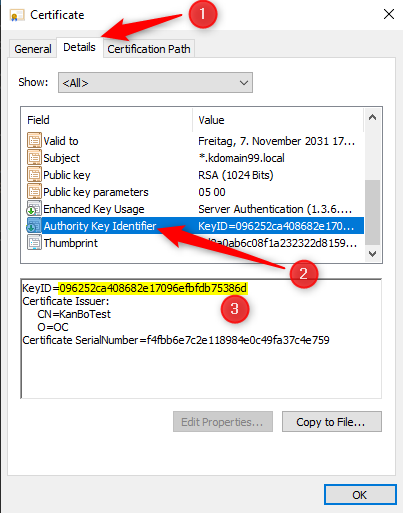
Additionally, please check also the expiration date of your High Trust Certificate, you can do this directly within the Certificate Details or also you can follow the instructions in this article here.
Was this article helpful?
Please, contact us if you have any additional questions.